


Going: Find Flight Deals
4.6192.00 Reviews
App Specs
- Version
- 4.20.1
- Updated On
- License
- Free
- Downloads
- 100,000+
- Developer
- Going
- Categories
- Travel & Local
- Platform
- Android
Screenshots



 Analysis by AppCompare
I decide whether a flight-deal app is worth keeping by asking a practical question: can it help me notice trips I would otherwise miss, without making me surrender control of when and where I travel? Going: Find Flight Deals is built around that discovery-first idea. I see it as most useful for people who can be flexible, enjoy planning ahead, and are willing to act when a promising fare appears. It is less compelling if you already know your exact route and dates and simply want a conventional booking search.
Start with your travel habits, not the promise of a bargain
Before relying on any fare-alert service, I would think about how much flexibility I really have. A low price is only useful if the destination, departure airport, timing, and trip length can work in real life. Set preferences with those constraints in mind rather than making them so broad that every alert feels tempting. If you have fixed vacation days, a specific event, or a required arrival time, a direct search for those dates may be a better first step.
That distinction matters because deal discovery and trip planning solve different problems. Going is oriented toward surfacing opportunities; it does not remove the decisions that follow. I would treat a notification as a prompt to investigate, not as a finished itinerary or a guarantee that the trip suits me. Check the dates and route against your actual plans before you let an attractive fare set the agenda.
Who gets the most from deal alerts
I think the strongest fit is someone with a few possible destinations, some room to move dates, and enough time to compare options after an alert arrives. That could be a couple trying to choose between several weekend escapes, a family planning a trip well in advance, or a solo traveler who is happy to let a good fare influence the destination. The app’s value is in keeping those possibilities visible rather than requiring you to repeat the same searches every day.
It can also suit people who are still in the dreaming stage. Browsing possible trips can help turn a vague wish to get away into a realistic shortlist. My advice is to pair that browsing with a simple personal rule: decide what total trip cost and travel conditions are acceptable before an alert appears. A fare that looks compelling in isolation may not be a sensible choice once you consider the dates, airport journey, and other parts of the trip.
When a traditional flight search is the better tool
If I need to be in a particular city on a particular morning, I would not make an alert app my only planning method. I would search the exact route and dates through the usual flight-search options, then compare the available itineraries and booking details directly. That approach is also better when a trip has several passengers, a tight connection requirement, or other constraints that make a broad deal less useful.
There is a trade-off between being shown a possible bargain and having a full view of every option for a fixed itinerary. A deal-focused service can help uncover routes that might not occur to you, while a standard search is easier to use when you already know the destination and schedule. I would use them as complementary tools rather than expecting one to replace the other: let alerts inspire flexible trips, and use direct searches to solve specific travel requirements.
Worth Reading Before You Choose

Flipboard Shows What News Apps Must Do Beyond the Feed

Switching to Android Auto Means Rethinking Your Driving Routine

Google Calendar Makes a Crowded Week Easier to Manage

Ludo King Makes the Most of the Minutes Between Plans

Baby Panda World Brings Quick Play to Modern Phones, but Its Game Library Feels Busy

ESPN’s Live Game View Makes Following Close Games Easier
Make an alert actionable before it arrives
A useful habit is to decide in advance which home airport you can realistically use and which alternatives are worth the extra effort. A fare from a farther airport may look good but lose its appeal once ground transport, parking, or time are considered. If you are willing to travel from more than one airport, think through that trade-off before setting preferences, so an alert does not catch you making a rushed decision.
I would also keep a short note of the destinations I would genuinely take and the date ranges that could work. When a deal appears, that makes it easier to distinguish an exciting possibility from an itinerary that would cause problems at work or at home. This small bit of preparation is especially useful for time-sensitive fares: it helps you assess the trip rather than reacting only to the headline price.
Understand the handoff from discovery to booking
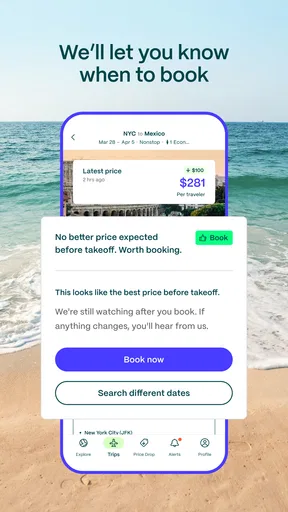
Finding a deal is not the same as completing a booking. Once something catches your eye, I would check that the itinerary is still available and review the details on the booking path before committing. Pay attention to the exact travel dates and airports, as well as any conditions that affect whether the fare works for you. The app can make discovery easier, but you remain responsible for deciding whether the final option fits your needs.
This handoff is a meaningful limitation for anyone who expects a single app to manage the entire trip. If you want to compare every detail of a fixed itinerary or prefer to handle booking and travel planning in one familiar workflow, a conventional search or booking service may feel more direct. For me, that extra step is acceptable when I am exploring flexible travel, but it is less attractive when I am under pressure to secure a specific flight quickly.
What the price and membership choice mean in practice
The app is free to download, but it also offers in-app purchases, with listed items ranging from $49 to $199. I would not treat a paid option as automatically worthwhile just because the idea of saving on flights is appealing. First decide how often you travel, how flexible you are, and whether you will act on the opportunities you receive. Someone who takes occasional trips with fixed dates may have little reason to pay for a deal-finding service, while a frequent, flexible traveler may be more motivated to explore what an upgrade offers.
Before spending, I would look carefully at the current purchase details in the app and consider whether the service fits my habits over time. The key question is not whether a deal sounds exciting; it is whether I am likely to use the alerts and have the flexibility to book when they matter. If I am still learning how I travel, starting with the free download gives me a chance to judge whether this style of discovery suits me before I consider paying.
There is also a practical difference between saving on a ticket and saving on a whole trip. A cheap flight can encourage extra spending on transport, accommodation, or days away that were not part of the original plan. I would set a trip budget, not just a fare target, and compare the complete plan with a trip I would have taken anyway. That keeps a tempting alert from turning into an expensive detour disguised as a bargain.
What’s the Buzz About?
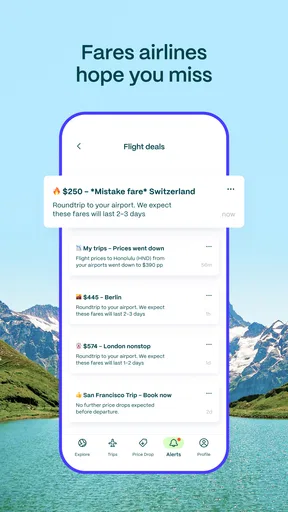
So, Going: Find Flight Deals promises to find you some of the best flight deals out there. The app hunts down those elusive discounts and error fares that can make your next trip much more affordable. The idea is pretty straightforward—who doesn't want to save money, right?
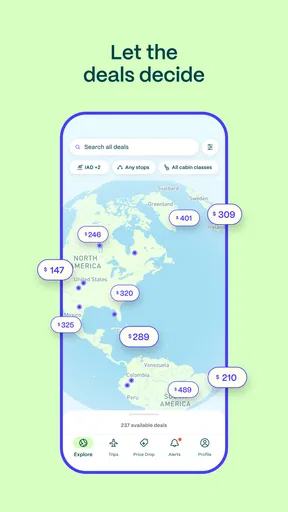
The interface is super user-friendly. When you first open the app, you're greeted with a clean and intuitive layout. No flashy distractions, just straight to business. You can set your home airport, and from there, it’s all about finding those sweet, sweet deals.
Features I Loved
One of the coolest features is the alert system. You set your preferences, and the app does the rest. Whenever there's a deal that matches your criteria, you get a notification. It's like having a personal travel assistant keeping an eye out for you. I was pleasantly surprised by how specific you can get with your preferences, making sure the deals you receive are actually relevant.
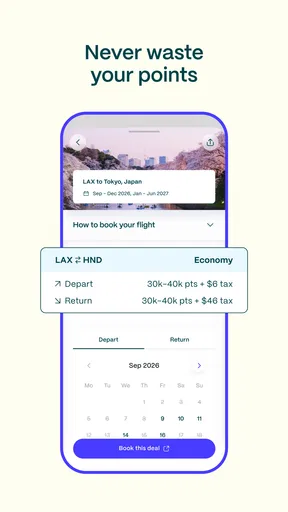
The app also offers a pretty neat way to browse through deals. You can filter by destination, price range, or even travel dates. This flexibility is a game-changer because it allows you to tailor your search to fit your schedule and budget.
Performance and User Experience
Now, let's talk about performance. No one wants an app that takes forever to load or crashes at the worst possible moment. Luckily, Going: Find Flight Deals runs smoothly. The load times are quick, and I didn't encounter any glitches during my exploration. This kind of reliability is crucial when you're trying to snag a time-sensitive deal.
The app’s design is sleek and modern, which makes navigation a breeze. I appreciated the minimalistic approach, focusing on functionality without sacrificing style. It feels like the developers really thought about the user experience, which is refreshing.
"Finding deals has never been this easy. It's like having a personal travel agent who works round the clock."
Is It Worth Downloading?
Absolutely, if you're a travel enthusiast or just someone who enjoys the occasional getaway. Even if you don’t have immediate travel plans, it’s fun to browse through the deals and dream a little. The potential savings are worth the download alone.
One thing to keep in mind is that while the app does a great job finding deals, it doesn't book the flights for you. You’ll need to handle that part yourself, but that’s a small price to pay for the savings you can find.
What to expect from the app over time
Going is a travel and local app from developer Going. It has a 3.6 average from 625 ratings, with 168 written reviews, and has passed 100K installs. Those figures suggest a real audience, but I would not use the rating alone to decide whether it suits me. People who want broad inspiration and people who need a very specific itinerary can judge the same deal-alert approach quite differently.
It is free to install and rated for Everyone. The current version is 4.9.4, and it requires Android 7.0 or later. I would check compatibility before downloading on an older device, then make sure notifications are enabled if timely alerts are part of how I plan to use it. If I keep notifications off, the app may still be useful for browsing, but I lose much of the convenience of being prompted when a relevant deal comes up.
A realistic example: I have a free weekend in mind but no fixed destination. I set my home airport and preferences, then browse when I have a few minutes rather than opening multiple searches for places I may never choose. If a suitable deal arrives, I compare its dates with my calendar, check how I would get to the airport, and work out whether the full trip fits my budget. If any of those pieces fail, I pass instead of treating the alert as an instruction to travel.
That workflow is where I see the real advantage: less repetitive searching, more informed flexibility. It does not make every trip cheap, and it cannot make an inconvenient schedule convenient. What it can do is give a flexible traveler a reason to investigate a route they might not have considered, while leaving the final call in their hands.
Who should keep looking
I would skip it, or at least avoid relying on it, if my travel dates and destination were non-negotiable. A person traveling for a wedding, appointment, or work commitment needs certainty about a particular journey more than a stream of possible bargains. Likewise, anyone who cannot respond to an alert or compare the booking details before deciding may get less value from a service centered on deal discovery.
It may also be the wrong fit if you prefer to browse every available flight for a route at once. Going’s appeal is the opportunity to notice deals, not a promise that it will replace every comparison tool or booking workflow. I would keep a familiar flight search option for exact-route planning and use this app only when there is room to be surprised by the destination or timing.
A balanced verdict for flexible travelers
On the wider travel-app landscape, I would put Going in the discovery category rather than treating it like a complete travel organizer. General flight search tools are often the more natural choice for comparing a known route, while a deal-alert approach makes more sense when I can choose among possibilities. Neither method wins for every trip: the right one depends on whether I am solving a precise transport problem or looking for an affordable reason to get away.
My recommendation is to try the free app if you have a usable home airport, some flexibility, and the patience to review a deal before acting. Keep your calendar and total-trip budget in view, and use a direct search when dates or arrival times are fixed. That way, a notification can become a genuinely useful lead rather than pressure to buy a flight that does not fit.
Final Thoughts
To wrap it up, Going: Find Flight Deals is a must-have for anyone looking to travel without breaking the bank. It's efficient, easy to use, and genuinely helpful in finding those hidden gems of the airline world. If you're serious about saving on your next adventure, give this app a go. Who knows, your next spontaneous trip might just be a notification away!
Pros
- User-friendly interface for easy navigation.
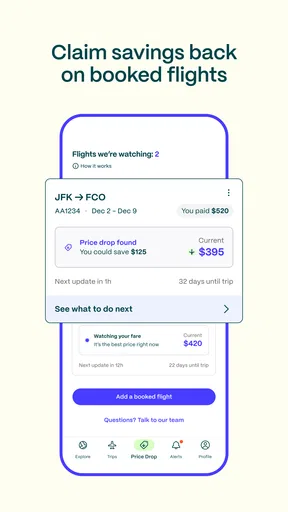
- Real-time notifications for price drops.
- Customizable search filters for flexibility.
- Supports multiple currencies for convenience.
- Offers exclusive deals and discounts.
Cons
- Limited airline options in certain regions.
- Requires account creation for full features.
- No offline access to saved searches.
- Occasional lag with loading search results.
- Limited customer support availability.
FAQs for Going: Find Flight Deals
What is Going: Find Flight Deals, and how does it work?
Going: Find Flight Deals is an app designed to help users find the best flight deals available. It works by scanning various airlines and travel sites to present users with discounted fares and special offers. The app provides notifications and alerts for price drops, ensuring you never miss a great deal.
Is Going: Find Flight Deals free to use, or are there subscription options?
The app offers both a free version and a premium subscription. The free version provides access to basic features, while the premium subscription, known as Going Premium, offers more personalized deals, faster notifications, and access to exclusive discounts. The premium service typically requires a monthly or annual fee.
How reliable are the flight deals found on this app?
The flight deals on Going: Find Flight Deals are sourced from a wide network of airlines and travel providers. While the app strives to ensure accuracy, prices and availability can change quickly. Users are advised to book promptly and verify all details directly with the airline or travel agency before finalizing any purchase.
Can I set specific preferences for flight deals, such as destinations or travel dates?
Yes, Going: Find Flight Deals allows users to set preferences for specific destinations, travel dates, and budget limits. By customizing these settings, the app can provide more relevant and tailored flight deals, ensuring that users receive alerts that match their travel plans and preferences.
Does Going: Find Flight Deals support international flights, or is it limited to domestic travel?
Going: Find Flight Deals supports both domestic and international flights. Users can explore deals for various destinations around the world, allowing them to plan trips whether they are looking for a quick domestic getaway or an extensive international adventure. The app's wide range of options ensures flexibility for all travelers.


